


Best AI in 2026: ChatGPT vs Claude vs Gemini vs Perplexity — Which One Is Actually Right for You?

Four AI giants. Hundreds of features. One big question: which AI is actually worth using in 2026?
If you’re tired of a new AI update notification popping up every other week, you’re not alone. Best AI in 2026 isn’t just a question tech nerds ask anymore — my cousin, who runs a small boutique, asked me the exact same thing last week: “Should I get ChatGPT or Claude?” My neighbor, a college student, asked something similar a few days later, except her question was about which one wouldn’t get her essay flagged for “sounding too AI.”
And that’s the real problem with AI in 2026.
There are too many good options, and choosing between them isn’t getting easier.
ChatGPT, Claude, Gemini, and Perplexity can all write, research, analyze information, work with documents, answer questions, and help you get things done. But they don’t behave exactly the same way.
One may be better suited to coding and automation. Another may feel more comfortable for long-form writing. One fits naturally into Google’s ecosystem, while another is built around research and citations.
Honestly, I’ve been using all four of these tools — ChatGPT, Claude, Gemini, and Perplexity — in my actual daily work for months now. Writing content for clients, fixing a stubborn spreadsheet formula, quick fact-checking before a meeting, even planning a weekend trip.
Each one has its own personality, almost like a different coworker with different strengths, blind spots, and quirks you only notice after using them regularly.
The important part?
You don’t necessarily need the “most powerful” AI. You need the AI that fits the way you actually work.
This isn’t another generic comparison table you’ve already seen fifty times. I’ll walk you through which AI genuinely works best for which task, based on real, hands-on use — not just marketing claims or benchmark screenshots.
By the end, you’ll have a much clearer idea of which AI tool — or combination of AI tools — actually fits your life, work, studies, or business.
Why the AI Landscape Shifted So Fast in 2026
AI isn’t moving at the speed of normal software anymore — and that’s why old AI comparisons become outdated so quickly.
In the past year alone, OpenAI went from GPT-5 all the way to GPT-5.5, releasing roughly six major model updates in under a year.
That’s not a normal release cadence, and it tells you how competitive this space has become.
Google hasn’t slowed down either. Gemini 3 Pro and Gemini 3 Flash are now the default models, woven into everything from Gmail to Android Auto to Google TV, and even licensed out to power features on Apple’s Siri.
Meanwhile, Perplexity quietly turned its Comet browser into a free, global product, moving away from a purely chatbot-style interface toward something closer to an AI-native way of browsing the entire internet.
And Anthropic has kept pushing Claude toward being the more careful, more trustworthy option for people who need to actually rely on what the model tells them.
Why does this matter?
Because AI assistants aren’t simply chatbots anymore.
They’re increasingly becoming interfaces between users and their work.
A freelancer might use AI to research a topic, create an outline, write an article, analyze a spreadsheet, prepare an email, and organize a project.
A developer might ask an AI assistant to understand an existing codebase, identify a bug, suggest a fix, write tests, and explain the changes.
A student might use one tool to research a subject, another to understand difficult concepts, and another to organize notes.
So instead of asking:
“Which AI model is the smartest?”
A much more useful question is:
“Which AI tool can save me the most time on the things I actually do?”
What that means practically is simple: a comparison you read six months ago is probably already stale.
Treat guides like this one as living documents, and do a quick sanity check of your own before making a final decision, especially if pricing or features matter to you.
ChatGPT: Most Versatile, But a Bit Overconfident
If you want one AI that can jump from writing to coding to data analysis to multi-step tasks, ChatGPT is built around that versatility.
ChatGPT’s latest model, GPT-5.5, released in April 2026, currently leads most raw benchmarks among publicly available models.
Coding, data analysis, multi-step agentic tasks — it handles all of these impressively, and it does so with less hand-holding than earlier versions needed.
You can hand it a messy, multi-part task and it will plan, use tools, check its own work, and keep going without you babysitting every step.
That’s particularly useful for people who don’t necessarily know exactly how to break a complicated problem into smaller prompts.
For example, a freelancer could provide a client brief containing incomplete information and ask ChatGPT to identify missing details, organize the requirements, create a project structure, and produce a first draft.
I once handed it a messy client brief with half-finished instructions and missing context, and GPT-5.5 figured out most of the gaps on its own instead of pestering me with clarifying questions.
That’s genuinely useful if you’re a freelancer or solo operator juggling ambiguous requests on a tight deadline.
It’s also become noticeably better at things like operating software and navigating between tools, which matters if you’re using it for actual workflow automation rather than just chat.
Where ChatGPT Stands Out
Versatility is probably ChatGPT’s biggest practical advantage.
You can use the same platform for:
- Writing and editing
- Brainstorming
- Coding
- Debugging
- Data analysis
- Document analysis
- Research
- Workflow automation
- Planning
- Creative projects
- Multi-step tasks
That breadth makes it particularly useful if you don’t want to maintain several separate AI subscriptions.
But there’s an important catch.
One thing that bugs me, though, is that its confidence doesn’t always match its accuracy.
While researching a niche topic, it casually invented a statistic that simply didn’t exist, stated with total confidence and even a fake-sounding source attached.
For anything research-critical, I always double-check what it tells me against another source, especially numbers, dates, or anything that could embarrass me in front of a client.
ChatGPT also tends to be the most “opinionated” in terms of formatting — lots of bullet points, headers, and structure by default, which some people love and others find a bit much for casual conversation.
Best for: General productivity, agentic tasks, coding, brainstorming, workflow automation.
Watch out for: Confident-sounding but occasionally wrong facts — always verify before you publish or present anything important.
Claude: When You Need Nuance and Trust
Not every AI task needs maximum speed. Sometimes you need an AI that slows down, understands the context, and handles nuance carefully.
Claude, built by Anthropic, is my personal go-to for anything sensitive — parsing a legal draft, or carefully editing a long, nuanced document where tone matters as much as accuracy.
Its tone feels more thoughtful and measured, and it rarely bluffs confidently when it genuinely doesn’t know something, which matters a lot when accuracy is non-negotiable.
For long-form writing or code review, I find Claude’s explanations easier to follow.
It doesn’t just hand you an answer — it walks you through the reasoning behind it, which makes it easier to catch mistakes before they become a real problem.
It also tends to stay coherent and reliable across very long documents without losing the thread of the conversation, which is something I genuinely struggled with when using other tools on hundred-plus-page documents.
Claude for Long-Form Work
This is where Claude becomes particularly interesting for writers, editors, developers, and professionals working with large amounts of text.
Long documents require more than simply generating fluent sentences.
The AI needs to maintain context, remember earlier instructions, preserve tone, and avoid contradicting information introduced several pages earlier.
That’s useful for:
- Editing reports
- Reviewing contracts
- Improving long articles
- Code review
- Research notes
- Business documents
- Brand guidelines
- Detailed proposals
Claude has also gotten noticeably better at pushing back when a request doesn’t quite make sense, rather than just agreeing with whatever you say.
If I give it a half-baked argument, it’ll gently point out the weak spots instead of just running with it.
For anyone doing serious editing or research work, that kind of honest feedback is more valuable than it sounds.
If you want to explore Anthropic’s broader ecosystem, there’s Claude.ai for everyday use, Claude Code for developers who want to delegate coding tasks straight from the terminal or their IDE, and Claude Cowork for non-developers doing agentic knowledge work through a desktop app — each one built around a slightly different kind of task.
Best for: Writing, editing, code review, sensitive or nuanced content, long documents.
Watch out for: Free tier usage limits can hit sooner than you’d expect if you’re a heavy user, so plan accordingly if you’re working on something long.
Gemini: Best Choice If You Live in the Google Ecosystem
Already living inside Gmail, Google Docs, Drive, Android and Google services? That’s where Gemini becomes especially interesting.
If you’re already using Gmail, Google Docs, or an Android phone, Gemini 3’s integration slots straight into your existing workflow without much friction.
Gemini 3 Flash is what Google itself calls the “best vibe coding model,” and in practice, it’s genuinely fast for everyday tasks where you don’t want to wait around for a long, deliberate response.
My favorite part is that Gemini can pull context directly from Gmail and Photos, so its suggestions feel personalized rather than generic.
It can flag something like “this looks like a flight confirmation, want it added to your calendar?” without you having to ask, which saves a surprising number of small daily annoyances once you get used to it.
Gemini’s Biggest Advantage: Integration
Gemini’s strength isn’t just the AI model — it’s where the AI lives.
For people already living inside Google’s ecosystem, convenience matters.
Think about a typical day:
You receive an email in Gmail, work on a document in Google Docs, check a file in Drive, use an Android phone, and perhaps manage your schedule through Google Calendar.
An AI assistant integrated across these services doesn’t need to feel like another website you have to open.
Gemini 3 Pro is better suited for complex reasoning and math-heavy work, while Flash is built for everyday, speed-sensitive tasks where you just need a quick, solid answer.
Google has also been pushing Gemini heavily into creative tools — things like Lyria for AI-generated music and various image generation features — so if you want one tool that covers text, images, and audio reasonably well, Gemini is a strong all-rounder.
The native Gemini apps on macOS and now deeper Android integration mean it genuinely feels less like “a website you visit” and more like “a layer that sits across your devices.”
For people who’ve spent years inside the Google ecosystem, that’s a real, tangible advantage over the others.
Best for: Google Workspace users, multimodal tasks, quick everyday queries, cross-device convenience.
Watch out for: For deep, independent research, Perplexity or ChatGPT tend to be more thorough and better sourced.
Perplexity: The Research and Fact-Checking Specialist
When the answer needs sources, don’t just ask an AI to sound confident — ask where the information came from.
Perplexity sits in its own category — less a chatbot, more of an AI-powered search engine.
Every answer comes with source citations attached, which makes it genuinely useful for research or fact-checking rather than just taking the model’s word for something.
This alone makes it my default choice whenever I need to back up a claim with a real, clickable source.
That citation-first approach changes how you interact with AI.
Instead of asking an AI for an answer and then separately searching Google to determine whether the answer is correct, Perplexity puts the sources directly alongside the response.
Its Comet browser is now free worldwide, with no account needed for basic browsing.
The built-in sidebar assistant can summarize open tabs, draft emails on your behalf, and even handle multi-step tasks in the background while you do something else — things like comparing prices across shopping tabs or pulling together travel information without you manually switching between fifteen tabs.
Whenever I need to verify a statistic or check a current event, Perplexity is the first thing I open, because sources show up immediately instead of me having to take the model’s confidence at face value.
For students writing research papers, this citation-first approach is genuinely a game changer compared to trying to verify claims from a plain chatbot after the fact.
Where Perplexity Makes the Most Sense
Perplexity becomes especially useful when the information you’re looking for changes frequently.
Examples include:
- Current events
- Recent technology updates
- Product research
- Market information
- Statistics
- Travel research
- Academic research
- Source verification
- News-related questions
Perplexity also offers paid tiers for people who want more advanced models or autonomous background assistants that can run tasks unsupervised.
Most casual users, though, will get the majority of the value from the free tier alone, which is refreshing in an industry that increasingly pushes everyone toward a subscription.
Best for: Research, citations, current events, fact-checking, browsing-heavy workflows.
Watch out for: Not as strong for creative writing or long-form content compared to the others.
Speed, Multimodal Ability, and Everyday Feel
Raw benchmark scores don’t tell you what it’s actually like to use an AI every day.
Beyond raw intelligence, how a tool actually feels to use day-to-day matters a lot, and this is where the four tools diverge more than benchmark charts suggest.
ChatGPT feels the most “agentic” — it wants to take a task and run with it, checking its own work along the way.
Claude feels the most conversational and careful, like you’re working alongside someone who double-checks before speaking.
Gemini feels the most ambient, quietly available across your devices without you thinking about it much.
Perplexity feels the most like a research assistant sitting next to a stack of open browser tabs, always ready to cite its sources.
This difference becomes important after you’ve used these tools for several weeks.
A benchmark might tell you that one model performed better on a particular test, but that doesn’t necessarily tell you which interface you’ll naturally prefer when you’re working under a deadline.
Multimodal AI in 2026
The next AI battle isn’t only about text. Images, audio, video and documents are becoming part of everyday AI workflows.
On multimodal tasks — handling images, audio, or video alongside text — Gemini currently has the broadest native support baked directly into the everyday app experience, partly because Google has spent years building multimodal infrastructure across Search and Photos.
ChatGPT and Claude both handle images and documents well, but Gemini’s advantage shows up specifically in tasks that blend multiple media types in a single request.
For users who frequently move between text, images, documents, and audio, multimodal support can make a noticeable difference.
Quick Comparison — Which One for Which Task?
Here’s where the real answer to “Which AI should I use?” starts becoming clearer.
Content writing or blogging works best with Claude or ChatGPT, depending on whether you want structured reasoning or raw speed.
Coding and debugging lean toward ChatGPT’s GPT-5.5 or Gemini 3 Flash, both of which have gotten noticeably better at agentic, multi-step coding tasks over the past year.
If you need research backed by real citations, Perplexity is the clear choice, especially for anything you plan to publish or submit academically.
Deep integration with Google’s apps points you toward Gemini, particularly if your entire workflow already lives inside Gmail, Docs, and Drive.
Sensitive documents and trust-heavy work are where Claude shines, especially anything involving legal, medical, or financial nuance where a confidently wrong answer could cause real harm.
And for quick student assignments or fast facts, either Perplexity or Gemini will usually do the job well without much fuss.
The important point is that these categories overlap.
You don’t necessarily have to choose one AI and abandon the other three.
Many people will get better results by using different AI systems for different stages of the same workflow.
For example, someone might use Perplexity to find sources, Claude to refine a long document, ChatGPT to automate a workflow, and Gemini to interact with information already stored in Google services.
A Quick Snapshot of Pricing
Before paying for an AI subscription, ask one simple question: will it actually save you more time or money than it costs?
Most tools’ free tiers are decent enough for everyday, basic use, but advanced features across the board tend to sit around twenty dollars a month for paid plans.
Perplexity’s free Comet browser is especially generous here — you get a lot of functionality without paying anything at all, with optional add-ons like Comet Plus for premium publisher content sitting at a modest few dollars a month on top.
On the higher end, most of these companies also offer power-user tiers priced well above the standard subscription, aimed at people who want autonomous background agents or significantly higher usage limits.
Enterprise pricing for teams typically scales per seat and includes things like stricter data handling, deployment controls, and compliance certifications that individual users don’t need to worry about.
Pricing shifts fairly often in this space, so it’s worth checking each company’s official pricing page directly before committing to a paid plan, rather than relying on older articles like this one.
What’s accurate today may not be accurate in three months, and that’s simply the nature of how fast this industry is currently moving.
Choosing Based on Who You Are
The best AI for a student isn’t necessarily the best AI for a developer — and that’s exactly why one-size-fits-all AI rankings can be misleading.
If You’re a Student
If you’re a student, Perplexity’s citation-heavy answers plus Gemini’s quick everyday help probably cover most of what you need, and both have generous free or discounted education tiers worth checking out.
Students may also benefit from using AI as a learning assistant rather than simply asking it to produce finished answers.
For example, you can ask an AI to explain a difficult concept at three different levels, create practice questions, summarize notes, or point out gaps in your understanding.
If You’re a Freelancer or Small Business Owner
If you’re a freelancer or small business owner, ChatGPT’s agentic capabilities can genuinely save hours on repetitive tasks, while Claude is worth keeping around for anything client-facing where tone and accuracy really matter.
A freelancer might use AI for proposals, emails, content planning, spreadsheet analysis, research, meeting notes, and client documentation.
The biggest productivity gains often come from combining several small AI-assisted tasks rather than expecting one model to completely run a business.
If You’re a Developer
If you’re a developer, both ChatGPT and Claude offer dedicated coding-focused products, and it’s worth trying both on your actual codebase rather than trusting benchmarks alone.
Your own programming language, framework, repository size, development environment, and preferred workflow can affect which tool feels more useful.
If You’re a Google User
And if you’re simply someone who wants one tool woven into your existing phone and email, Gemini is probably the path of least resistance.
Its value isn’t only about model intelligence. The integration itself can remove friction from everyday tasks.
Don’t Choose an AI Tool Based Only on Benchmarks
The AI that wins a benchmark doesn’t automatically win your workflow.
Benchmarks are useful, but they don’t tell the whole story.
A benchmark measures performance under a particular test setup. Real life is messier.
You may have incomplete instructions, badly formatted files, contradictory requirements, outdated information, or a task that changes halfway through.
That’s why actual workflow testing matters.
Take the same real-world task and give it to two or three AI tools.
For example:
- Give each AI the same writing brief.
- Ask each one to analyze the same document.
- Give each one the same coding problem.
- Ask each one to research the same topic.
- Compare how easy it is to verify the result.
- Check how much editing you need to do afterward.
After several tasks, you’ll have a much better understanding of which tool fits your workflow.
My Personal Take
So, after all these comparisons, which AI would I actually choose?
If you ask me what the best AI in 2026 actually is, the honest answer is that there isn’t just one.
I use all four tools for different things, and that’s the approach most power users seem to have settled into by this point in the year.
Trying to force yourself into a single tool for every possible task usually means settling for “good enough” in areas where a different tool would genuinely be better.
Start with whichever free tool matches your primary need, and add others as your use case becomes clearer over time.
You get the most value out of AI when you pick tools based on your specific work, rather than just chasing whichever one happens to be trending that particular week on social media.
Conclusion
The biggest mistake in choosing AI in 2026 is asking “Which one is the best?” before asking “What do I actually need it to do?”
The competition in 2026 is tight enough that declaring a single overall winner doesn’t really make sense anymore.
Finding the best AI in 2026 isn’t about chasing the most “powerful” model on a benchmark chart — it’s about matching the tool to your actual daily work.
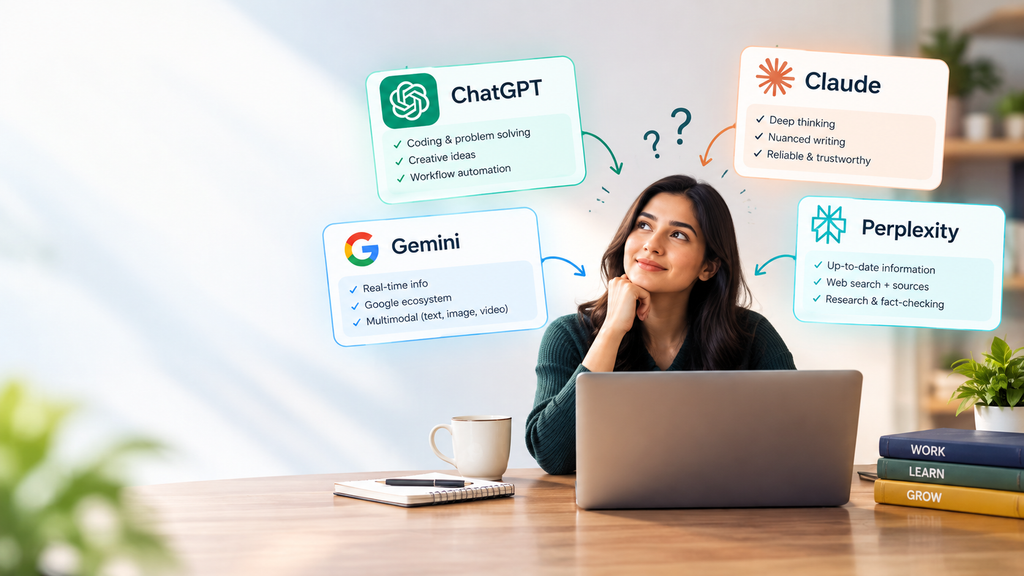
ChatGPT brings versatility and agentic power, Claude brings trust and nuance, Gemini brings seamless integration across Google’s ecosystem, and Perplexity brings reliable, source-backed research.
The four platforms increasingly overlap, but their different approaches still make them useful for different kinds of users.
The smartest approach isn’t necessarily to subscribe to everything immediately.
Start with the tool that matches your primary use case. Use its free version, test it against real tasks, and pay attention to where it saves you time and where it creates extra work.
If you regularly research information, citation support may matter more than writing style.
If you write long documents, context handling and editing quality may matter more.
If you’re a developer, coding workflow and repository interaction may be more important.
And if you’re deeply embedded in Google services, integration may be the deciding factor.
In other words, the “best AI in 2026” isn’t necessarily the AI with the biggest benchmark score. It’s the one that makes your actual work easier.
Try all of them where you can, pay attention to which one you naturally reach for without thinking about it, and stay flexible enough to switch or add another tool when your needs change.
FAQ Section
Q1. Which AI is the most accurate in 2026?
Accuracy depends on the task.
For research and fact-checking, Perplexity is considered more reliable thanks to its citation-based approach, while Claude tends to perform better for nuanced, creative writing.
However, no AI should automatically be treated as perfectly accurate. Important facts, numbers, dates, legal information, medical information, financial details, and research claims should be independently verified.
Q2. Can I get by on the free version, or do I need a paid plan?
For casual, everyday use, most free tiers are plenty — especially Perplexity’s Comet browser.
But for heavy daily usage, coding, or large documents, a paid plan around $20/month gives a much smoother experience.
Whether the subscription is worthwhile depends on how frequently you use the tool and whether the additional limits and features actually save you enough time.
Q3. Which AI is best for business or freelancing?
If you’re deep in Google Workspace, Gemini will feel seamless.
For client-facing writing or sensitive documents, Claude tends to work better.
For agentic, multi-step work — research through to a finished report — ChatGPT’s GPT-5.5 is a strong option.
Perplexity is particularly useful when a freelancer or business needs source-backed research and current information.
Q4. Are AI model answers always 100% accurate?
No.
No AI model is completely error-free — they can “hallucinate,” stating incorrect information in a confident tone.
For anything critical or fact-based, always verify independently.
This is especially important when you’re publishing information publicly, making business decisions, preparing academic work, or dealing with legal, medical, or financial topics.
Q5. Can I use more than one AI tool?
Absolutely.
In fact, using different tools for different tasks can make more sense than trying to force one platform to do everything.
You could use Perplexity for source discovery, Claude for long-form editing, ChatGPT for workflow automation and coding, and Gemini for Google Workspace-related tasks.
Q6. Will today’s best AI still be the best AI next year?
Not necessarily.
The AI market changes extremely quickly. New models, features, pricing plans, integrations, and products can significantly change the competitive landscape.
That’s why it’s better to evaluate AI tools based on your current workflow rather than assuming that today’s market position will remain unchanged.
Q7. Should I trust AI-generated information without checking it?
No.
AI-generated information should be treated as a useful starting point, not automatically as a final authority.
For important information, verify claims against reliable primary or authoritative sources before publishing, submitting, or acting on them.
Final Takeaway
ChatGPT vs Claude vs Gemini vs Perplexity isn’t really about finding one universal winner. It’s about finding the right AI for the job.
ChatGPT can be useful for versatile productivity and agentic workflows. Claude is suited to nuanced writing and long-form work. Gemini fits naturally into Google’s ecosystem and multimodal workflows. Perplexity is built around research, browsing, and citations.
And because these tools continue to evolve, the answer will keep changing too.
The best AI in 2026 is the one that fits your workflow, saves you time, and helps you get better work done — not simply the one everyone is talking about this week.
Stay Connected for More AI & Wearable Tech Updates!
Don’t miss the latest updates on AI wearables, Samsung Health, Google Health Coach, smartwatches, health tracking, and preventive healthcare technology. Follow our social channels to stay updated with the latest developments in AI-powered health technology:
- 📺 YouTube: Watch detailed explainers, AI wearable comparisons, product updates, and the latest health-tech trends — Subscribe to Our YouTube Channel
- 📸 Instagram: Follow us for quick tech updates, AI wearable insights, health-tracking features, and informative visual content — Follow Us on Instagram
- 📘 Facebook: Join the discussion and share your thoughts on Samsung, Google, AI-powered wearables, and the future of personalized healthcare — Follow Our Facebook Page
- 🌐 Website: Explore more articles covering AI, smart wearables, health technology, and the future of preventive care — Visit Our Website